Imagine pointing your phone at a room, slowly walking around it, and ending up with a 3D scene so detailed you can fly a virtual camera through it. Not a flat panorama. Not a rough 3D scan. A photorealistic, interactive reconstruction of the space, with soft lighting, subtle reflections, and fine details like the weave of fabric on a couch or the condensation on a glass.
That is the promise of Gaussian splatting, and it is already delivering on it.
Gaussian splatting is a technique for turning a collection of regular photographs or a video into a full 3D scene. Instead of constructing a traditional polygon mesh the way older 3D scanning methods do, it represents the scene as millions of tiny, soft, overlapping blobs of color and transparency. Each blob is called a "Gaussian" (more on why later), and when they are all rendered together from any viewpoint, the result looks strikingly close to a real photograph.
The technique was introduced in a 2023 research paper that showed it could produce quality on par with the best neural rendering methods while being fast enough to view in real time. That combination of quality and speed is a big part of why it caught on so quickly.
Why people are paying attention
Before Gaussian splatting, getting photorealistic 3D from photos generally meant choosing between two imperfect options. Traditional photogrammetry could produce editable meshes, but often struggled with shiny surfaces, thin structures, and fine detail. Neural radiance fields (NeRFs) could render beautiful novel views, but were slow to train and slow to display. Gaussian splatting found a middle path: results that look great and render fast enough to move through interactively.
That matters because it opens up photorealistic 3D capture to a much wider range of people and projects:
- Architects and real estate teams can capture spaces and share immersive walkthroughs instead of static photos.
- Product designers and e-commerce sellers can create interactive 3D views of physical objects.
- VFX artists and filmmakers can capture real environments as digital assets.
- Hobbyists and 3D enthusiasts can turn everyday scenes into explorable 3D worlds.
- Researchers and educators can document cultural heritage sites, lab setups, or complex spatial environments.
You do not need to be a developer or a 3D artist to try it. If you can take a video on your phone and drag it into an app, you have everything you need to get started.
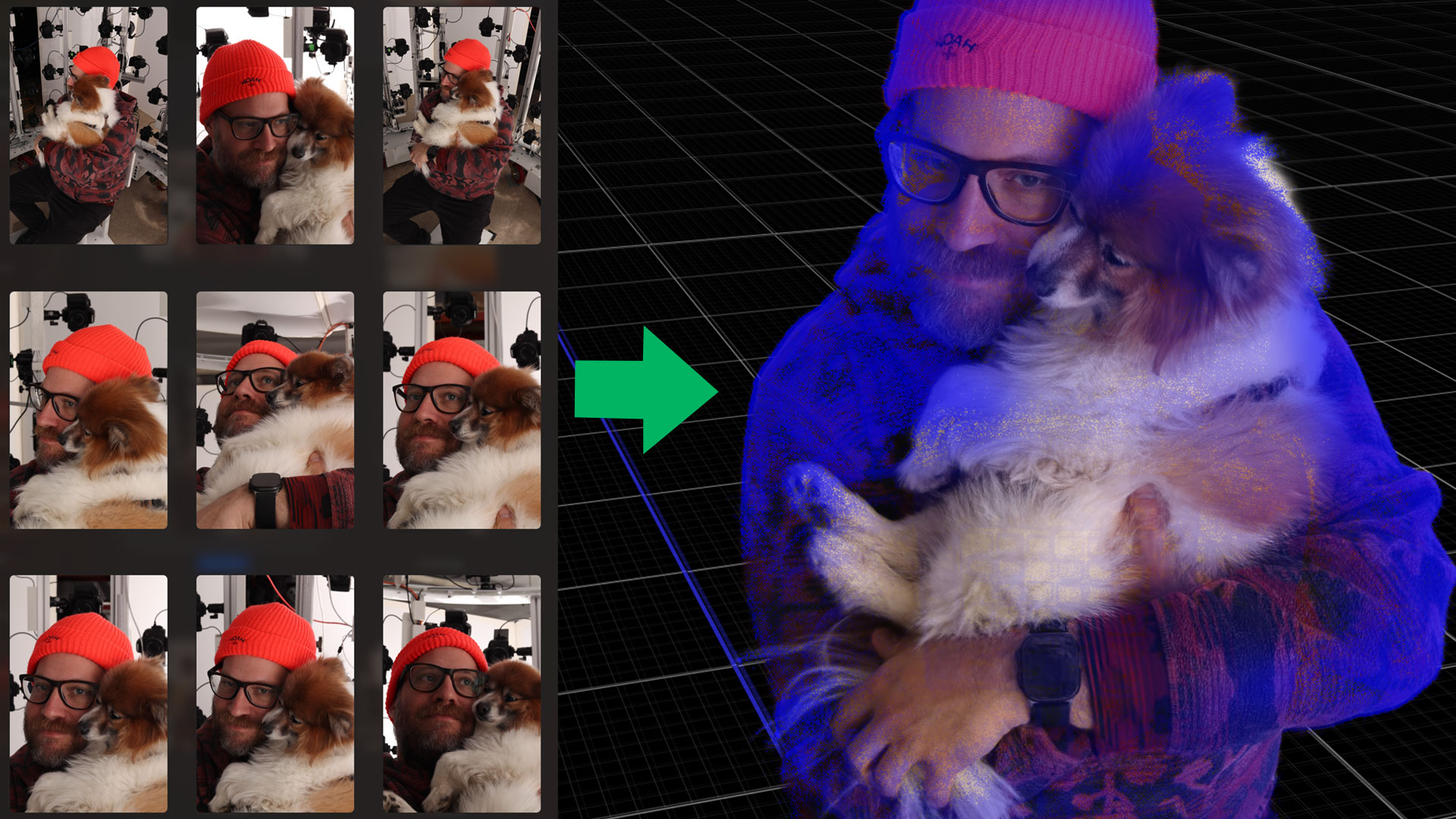
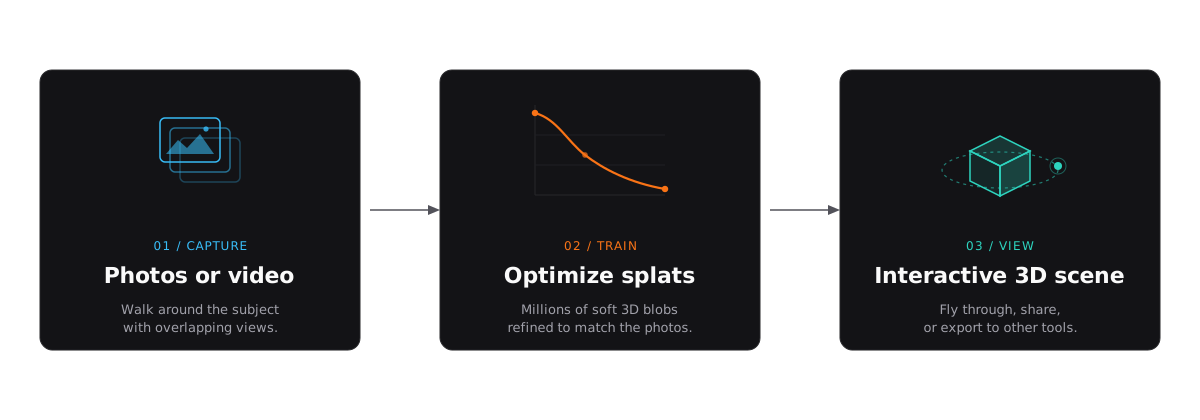
Later in this guide, we will cover exactly how the process works, what kind of results to expect, how Gaussian splatting compares to photogrammetry and NeRFs, and how to capture your own splat from photos or iPhone video.
Gaussian splatting is a way to turn photos or video of a real place or object into a 3D scene you can fly through. It works by filling the scene with millions of tiny soft blobs of color instead of building a polygon surface.
On this page
What Is Gaussian Splatting?
Think about how you might recreate a room using Lego bricks. You would snap together thousands of small, hard, opaque blocks until the shape roughly resembles the original space. The result is recognizable, but blocky. Now imagine doing the same thing, but instead of solid bricks you use millions of tiny translucent clouds of color. Each cloud is soft at the edges, has its own tint and transparency, and overlaps with its neighbors. From a distance, those clouds blend together into something that looks almost indistinguishable from a photograph.
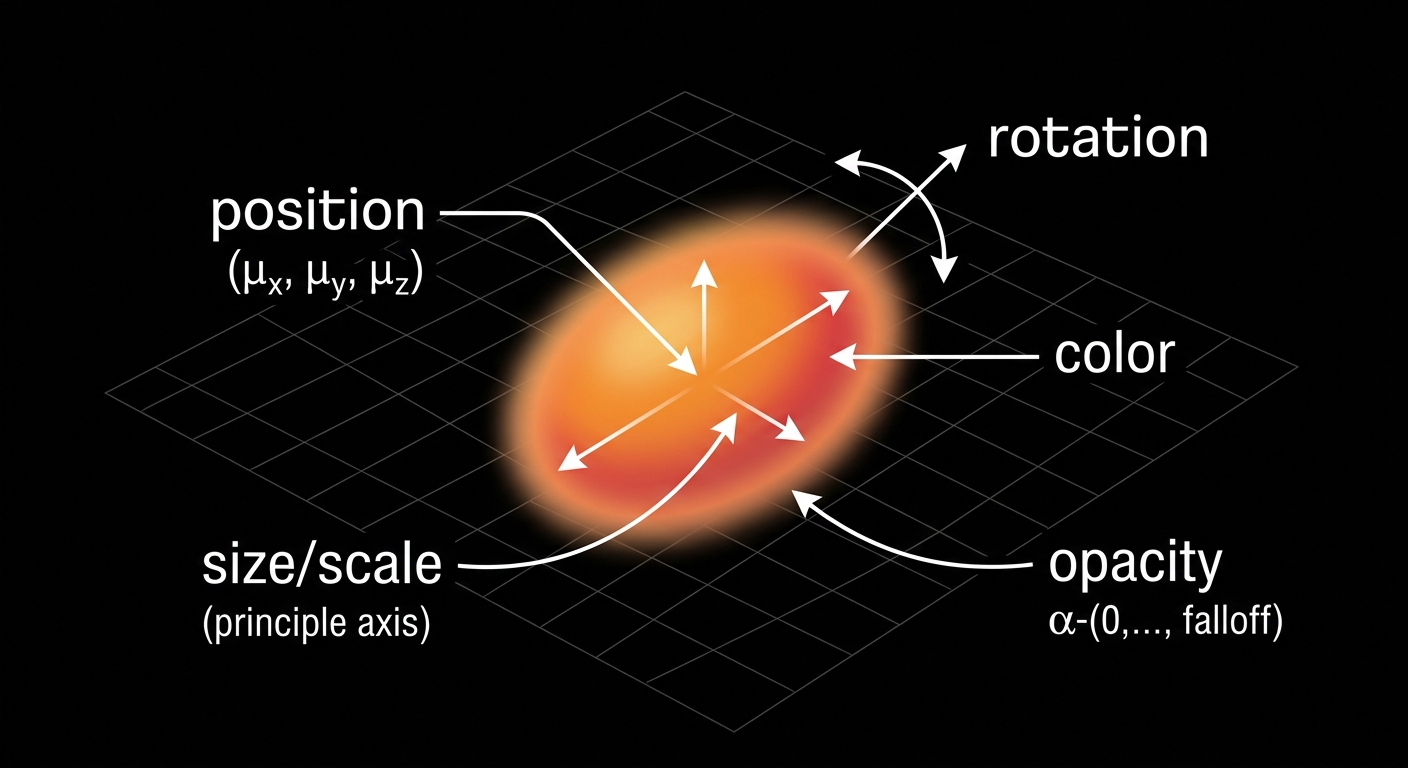
That is the core idea behind Gaussian splatting. A scene is represented not as a surface made of polygons, but as a huge collection of small, fuzzy, three-dimensional blobs positioned throughout the space. Each blob, called a Gaussian, stores a handful of properties:
- Position — where it sits in 3D space
- Size and shape — how large it is and whether it is stretched or squished in a particular direction (like a tiny football versus a tiny marble)
- Orientation — which direction it is rotated or tilted in space
- Color — what hue and brightness it contributes
- Opacity — how solid or transparent it is
A finished Gaussian splat scene might contain anywhere from hundreds of thousands to several million of these blobs. Individually, each one looks like a fuzzy smear of color. Together, they composite into a photorealistic view of whatever was captured.
Why "Gaussian"?
The name comes from the mathematical shape each blob uses: a Gaussian distribution, which is the same bell curve you might remember from statistics class. In three dimensions, a Gaussian looks like a soft, round (or stretched) cloud that is densest at its center and fades smoothly toward its edges. You do not need to understand the math to use Gaussian splatting — just think of each splat as a "fuzzy 3D point" that blends softly with everything around it.
Why "splatting"?
Splatting refers to how these blobs are drawn on screen. When the renderer needs to show the scene from a particular camera angle, it projects each 3D Gaussian onto the 2D screen — essentially "splatting" it flat, the way a snowball flattens when it hits a window. All the overlapping splats blend together based on their color and transparency, and the final image emerges.
Is it a 3D model? Is it AI?
A Gaussian splat scene is three-dimensional — you can orbit around it, fly through it, and view it from any angle — but it is not a traditional 3D model in the way most people think of one. There are no polygon surfaces, no UV maps, no texture files. It is closer to a very dense, very smart point cloud that knows how to look photorealistic from any viewpoint.
As for whether it is "AI": the training process uses optimization techniques that are adjacent to machine learning, but it is not generating or hallucinating content. It is reconstructing what the camera actually saw. Every splat in the scene corresponds to real visual information from the input photos or video. The result is a faithful reconstruction, not an AI-generated image.
Gaussian splatting reconstructs a 3D scene from photos or video using millions of soft, colored 3D points instead of a traditional polygon mesh. Each point is a tiny fuzzy blob. Together, they blend into a view that looks like a real photograph.
How Gaussian Splatting Works
At a high level, Gaussian splatting works by asking one question over and over: if we render this 3D scene from the same camera angles as the original photos, does it look like the photos? The software starts with rough information about the scene, then adjusts millions of small Gaussians until the rendered views match the real images as closely as possible.
You do not need to understand the math to use it. For beginners, the process is easiest to think about in four steps.
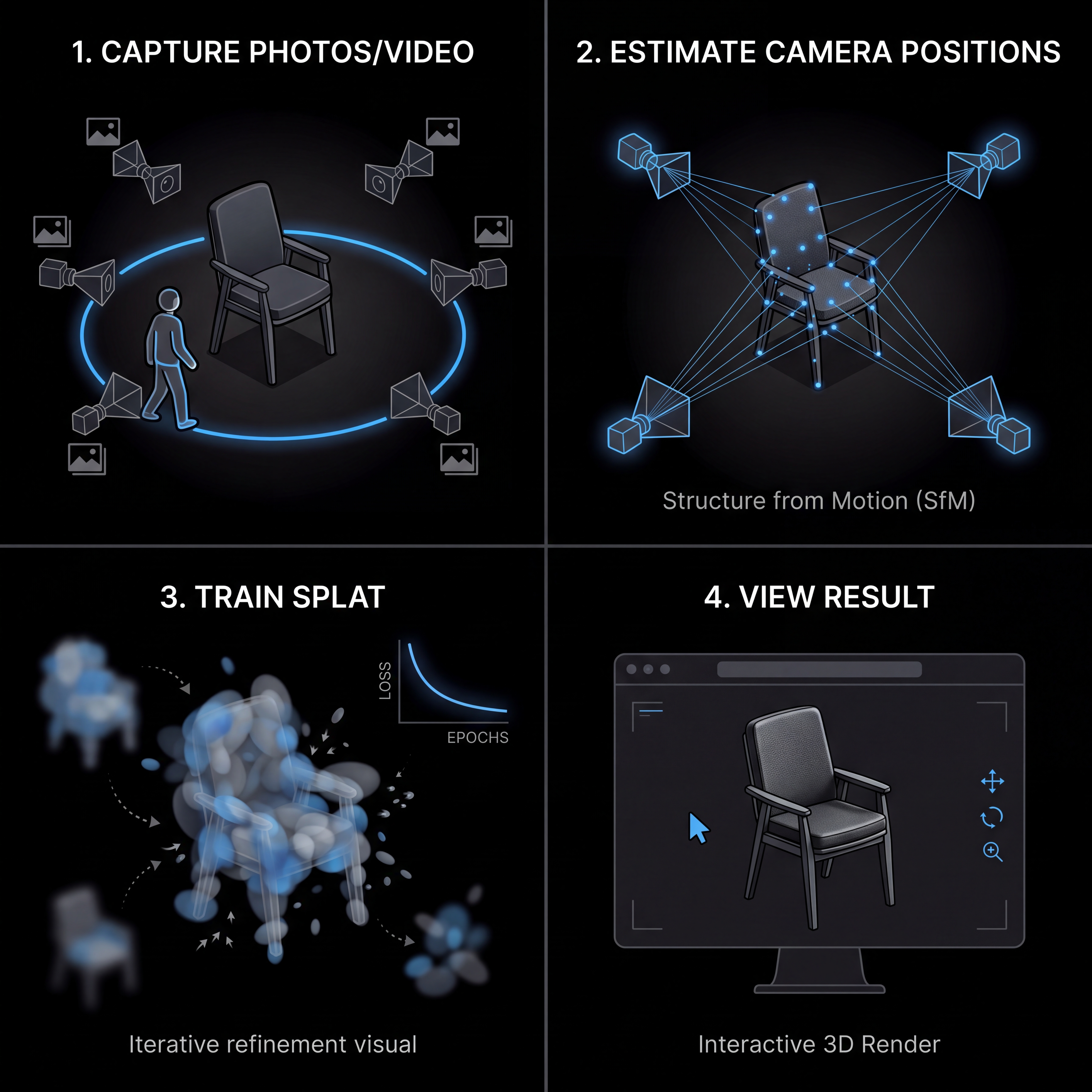
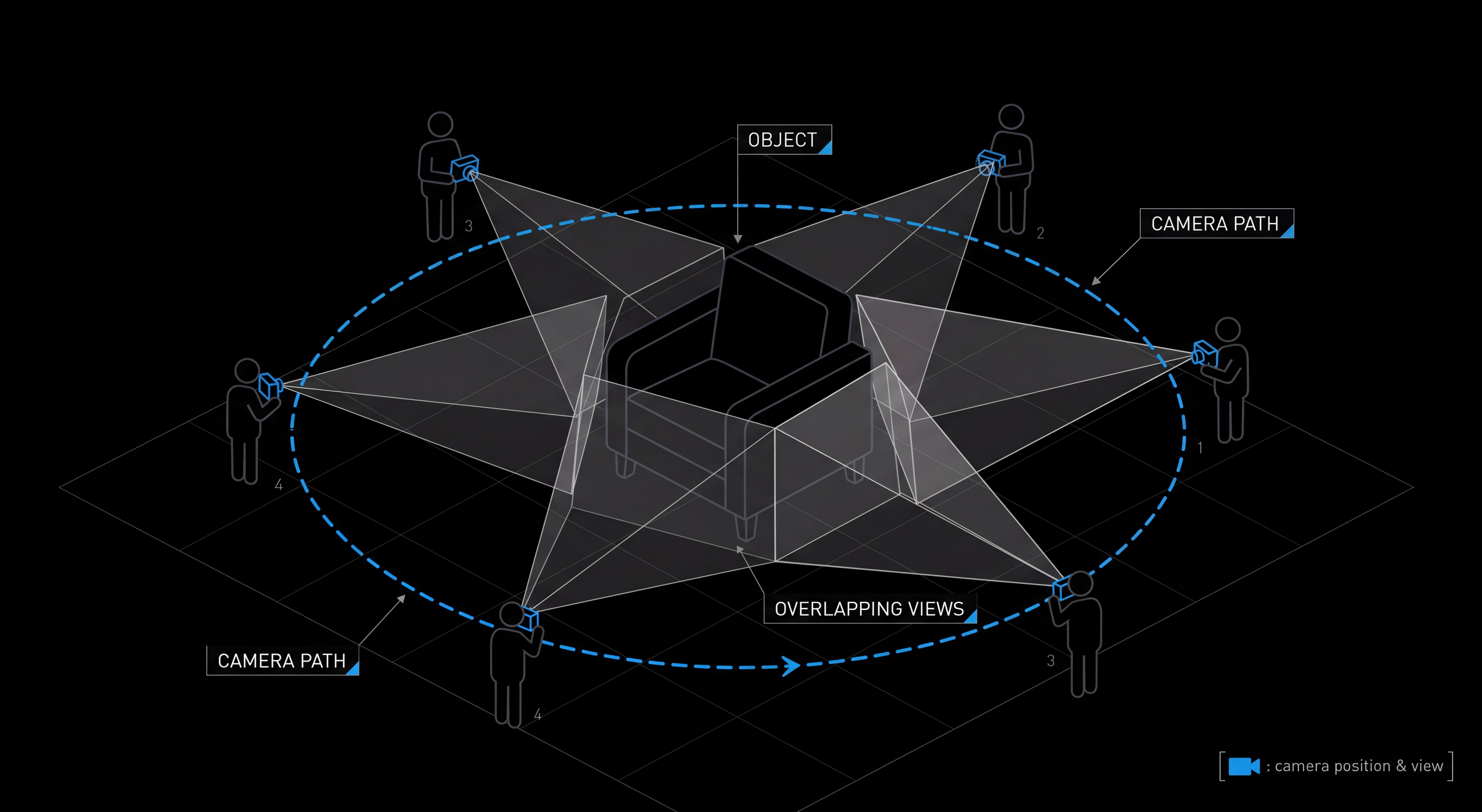
1. Capture photos or video
First, you capture the subject from many angles. That subject might be a small object on a table, a room, a building exterior, a garden, or any real-world scene you want to turn into 3D.
The important part is overlap. Each part of the subject should appear in multiple photos or video frames, from slightly different viewpoints. That overlap gives the software enough visual clues to understand how the camera moved and where things are in space.
You usually do not need a special camera. A phone video can work well, especially if you move slowly, avoid motion blur, and keep the subject in frame. You also do not usually need LiDAR. LiDAR can help in some capture workflows, but Gaussian splatting is mainly built around ordinary image data: photos, video frames, and the camera positions estimated from them.
2. Estimate where the camera was
Next, the software figures out where each photo or video frame was taken from. This step is often called camera calibration, pose estimation, or structure from motion.
In plain English, the app looks for the same visual details across many images: corners, edges, textures, and recognizable points. If a chair leg appears in one frame, then again in another frame from a slightly different angle, the software can use that change in position to infer both the camera movement and the approximate 3D location of the chair leg.
3. Train the splat
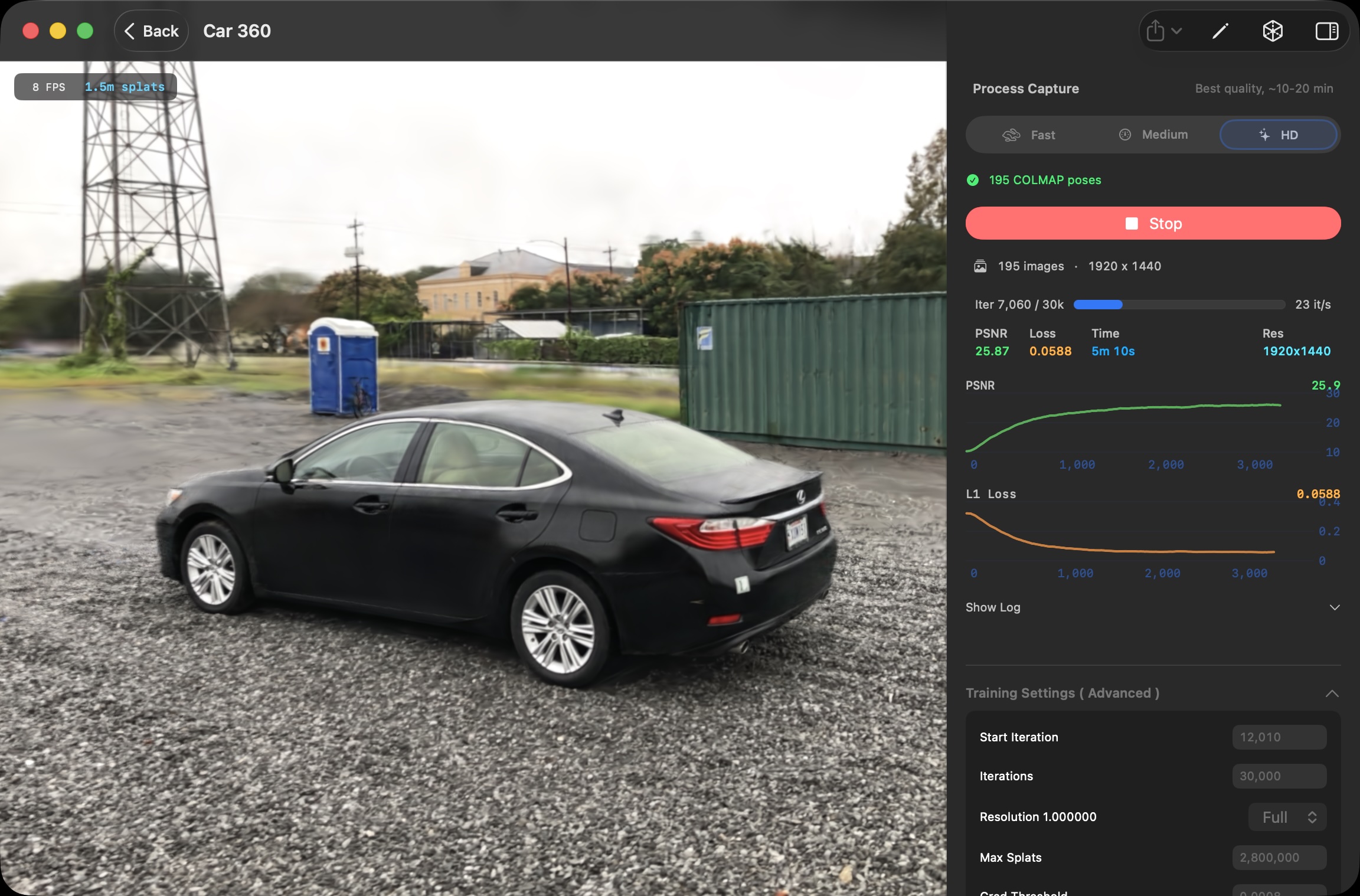
Once the camera positions are known, the software creates an initial cloud of 3D Gaussians. The original 3D Gaussian Splatting method starts from sparse points produced during camera calibration, then turns those points into optimizable Gaussians.
Training is the process of adjusting those Gaussians so the scene looks right. The app repeatedly renders the scene from the same viewpoints as your input images, compares the rendered result to the real photos, and updates the Gaussians to reduce the difference.
During training, each Gaussian can change in several ways:
- It can move to a better position in 3D space.
- It can become larger, smaller, rounder, or more stretched.
- Its color can shift to better match the original images.
- Its opacity can increase or decrease so it blends correctly with nearby splats.
- The scene can add, split, or remove Gaussians as it learns where detail is needed.
That is why the word "training" shows up so often. The app is not manually drawing a model. It is optimizing a 3D representation until the virtual camera views look like the real camera views.
4. View the result
After training, you get a 3D Gaussian splat scene that can be rendered from new viewpoints. You can orbit around an object, move through a room, or create a camera path for a fly-through video.
This is where Gaussian splatting feels different from many earlier photorealistic capture techniques. The finished scene is designed to render quickly, so you can often explore it interactively instead of waiting for slow offline renders. That real-time viewing is one reason Gaussian splats are useful for websites, demos, creative tools, and spatial documentation.
The result is still not the same as a clean polygon mesh. You usually would not treat it like a CAD model or send it straight to a 3D printer. But for capturing how a real place or object looks, Gaussian splatting can be remarkably effective.
Gaussian splatting turns photos or video into 3D by estimating the camera positions, creating millions of soft 3D blobs, and optimizing those blobs until renders from the training viewpoints match the original images.
Is a Gaussian Splat the Same as a 3D Model?
This is one of the most common questions beginners ask, and the answer is a careful "yes and no."
A Gaussian splat is a 3D representation of a scene. It exists in 3D space, you can move a camera through it, and you can view it from any angle. In that sense, yes, it is a 3D model.
But it is not the same kind of 3D model you would build in Blender, export from a CAD program, or download from a game asset store. Those are polygon meshes, and Gaussian splats work in a fundamentally different way.
Meshes describe surfaces. Splats describe appearance.
A traditional 3D model is built from polygons (usually triangles) connected at shared edges to form a continuous surface. That surface has clear geometry, defined edges, and texture maps wrapped around it using something called UVs. You can pick any triangle, move it, delete it, smooth it, or unwrap it. Everything is editable because everything has structure.
A Gaussian splat, by contrast, is a cloud of millions of soft, semi-transparent 3D blobs that, taken together, reproduce what the scene looks like from any viewpoint. There is no continuous surface. No triangles. No UV map. Each blob just stores its position, size, color, and how transparent it is. The "model" is really a recipe for rendering the scene rather than a description of its surfaces.
This difference shows up everywhere. If you tried to import a splat into a traditional 3D pipeline expecting to deform it like clay, snap it to a grid, or run a boolean cutout, you would have a frustrating time. A splat is closer to a volumetric photograph than a sculpted object.
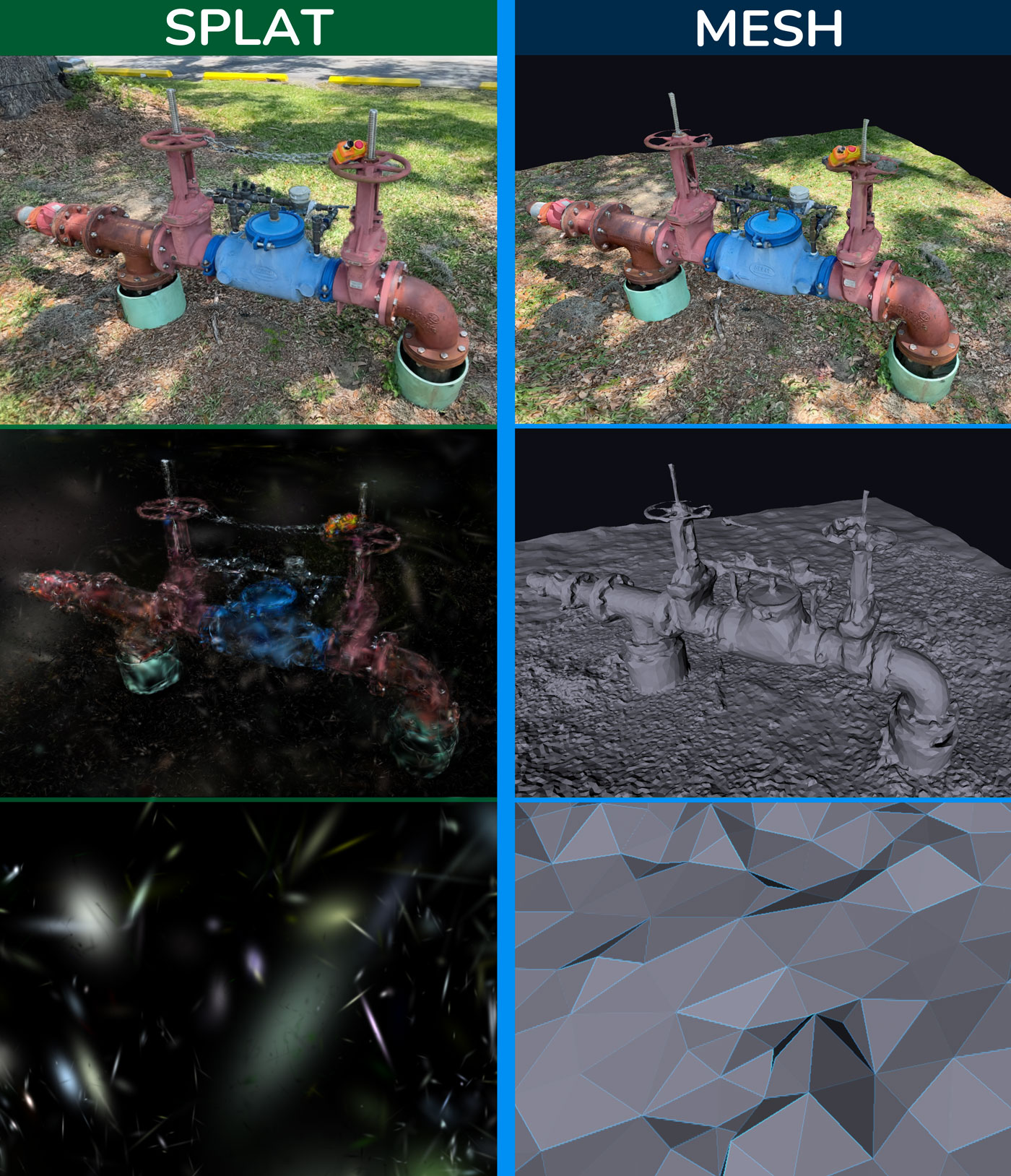
Left Column: Gaussian splats Right Column: triangle mesh.
Each is good at different things
Because they store information so differently, splats and meshes are good at different jobs. Neither is "better" overall — they solve different problems.
Gaussian splats are great for
- Photorealistic scene viewing
- Rooms, interiors, and architecture
- Outdoor spaces and landscapes
- Reflective and complex materials
- Foliage, hair, and thin details
- Messy real-world geometry
- Fast, low-effort visual capture
Polygon meshes are great for
- Game assets that need collision
- CAD-style precision editing
- 3D printing
- Animation rigs and deformation
- Clean product models
- UV-mapped texture work
- Tight control over geometry
A useful way to think about it: meshes are for things you want to manipulate; splats are for places you want to visit. If your goal is to capture how something looks and let people explore it, splats are hard to beat. If your goal is to edit, animate, simulate, or fabricate, you probably still want a mesh.
Quick answers to common questions
| Can I… | With a Gaussian splat? |
|---|---|
| 3D print it? | Not directly. Splats have no surface to print. You would need to convert the splat to a mesh first, and the result will only be as good as the conversion. |
| Edit it like a Blender model? | Not in the usual way. You can crop, transform, and clean up splats, but you cannot push and pull vertices, sculpt, or rig them like polygons. |
| Use it in a game? | Yes, with caveats. Splats look amazing as background environments, but they do not have collision out of the box and engine support is still maturing. |
| Animate or rig it? | Generally no. Splats are best treated as static captures. Animating them is an active area of research, not a turnkey workflow. |
| Embed it on a website? | Yes. There are several web viewers that can load and display splats interactively in a browser. |
So when someone asks "is a Gaussian splat a 3D model?" the most accurate answer is: it is a new kind of 3D representation that sits alongside meshes rather than replacing them. Splats are extraordinary for capturing how something looks; meshes are still the standard for working with how something is built.
Why Gaussian Splatting Became Popular
Gaussian splatting did not appear out of nowhere. Researchers had been working on photorealistic 3D capture for years. Photogrammetry had been around for decades. Neural radiance fields (NeRFs) had taken the research world by storm just a few years earlier. So why did this particular technique suddenly explode in 2023, with demos all over social media, dozens of viewers and tools popping up, and entire startups built around it?
The short answer: it hit a sweet spot that earlier methods could not.
The breakthrough: photorealistic and real-time
For most of the 2020s, the best-looking 3D scene captures came from neural radiance fields. NeRFs could produce stunning, photorealistic novel views of a scene from a small set of input images. The catch was performance. Training a NeRF could take hours. Rendering a single frame from one could take seconds. Interactive viewing — orbiting the scene smoothly with a mouse or trackpad — was either impossible or required heavy engineering tricks.
Photogrammetry sat at the other end of the tradeoff. The output was a regular polygon mesh, which meant traditional 3D engines could render it instantly. But the visual quality often suffered. Reflective surfaces produced strange artifacts. Thin structures like leaves or wires got smoothed away. Hair, fur, and foliage rarely looked believable.
The 2023 paper that introduced 3D Gaussian splatting proposed a representation that, in many cases, matched the visual quality of the best NeRFs while rendering hundreds of times faster — fast enough to be genuinely interactive on consumer hardware. That is the part that made people sit up.
Suddenly there was a way to:
- Capture a scene with ordinary photos or video.
- Get results that looked nearly photographic.
- Spin around inside that scene in real time, on a regular GPU.
None of those things were new on their own. Doing all three at once, with one technique, was.
Why real-time viewing changes everything
It is easy to underestimate how big a deal "real-time" is. A method that takes ten seconds per frame is a research curiosity. A method that runs at sixty frames per second is something you can put on a website, in an app, on a phone, or in a creative tool and have people actually use it.
Real-time rendering opens the door to:
- Interactive web viewers where anyone can drag and orbit a scene without installing anything.
- VR and AR experiences built from real captured environments instead of hand-modeled ones.
- Creative tools where artists can place, light, and compose with captured scenes the way they would with photos or video clips.
- Live previews while you are still capturing, so you can see what you are missing and fix it on the spot.
None of those workflows are practical if every viewpoint takes seconds to render. The moment they became practical, a wave of tools and creators jumped in.
Why creators care, not just researchers
Plenty of impressive 3D techniques never make it out of academic papers. Gaussian splatting did, and the reason is mostly practical. From a creator's point of view, it removes a lot of the friction that made photorealistic 3D capture feel out of reach.
- Capture is normal. You can use the camera you already own — a phone, a mirrorless, a drone — and shoot the way you would for a regular video or photo set.
- The result feels real. Reflections, soft shadows, foliage, fabrics, and other "messy" details that wreck mesh-based scans tend to come through naturally.
- Sharing is interactive. Instead of a flat render or a video flythrough, you can hand someone a scene they can move around in.
- There is less cleanup. Photogrammetry meshes often need extensive manual repair — filling holes, decimating polys, fixing UVs. Splats skip most of that because they are not trying to be a clean mesh in the first place.
Different communities latched onto different parts of that list. Real estate teams cared about interactive walkthroughs. Product photographers cared about realistic materials. VFX artists cared about turning location scouts into reusable digital backdrops. Hobbyists cared about scanning their bedrooms, gardens, or vintage cars and showing friends. Heritage and research teams cared about documenting places that might not be there forever.
The technique was flexible enough to fit all of those workflows without forcing anyone to become a 3D specialist.
Why this is happening now
Three things came together at roughly the same time.
First, the underlying technique was finally good enough. The 2023 paper hit a quality and speed bar that earlier methods kept missing.
Second, consumer hardware caught up. Modern GPUs — including the ones in recent Macs, gaming PCs, and even some phones — can render millions of Gaussians smoothly. A few years ago, that would not have been true.
Third, the tooling exploded. Within months of the original paper, open-source viewers, web players, capture apps, and training tools started showing up. That made the technique accessible to people who had never read a graphics paper in their life and never planned to.
For Mac users specifically, the timing has been good. Apple Silicon GPUs are well-suited to the kind of dense parallel work splat training and rendering require, and there are now native macOS tools — including 3D Splat App — that let you train scenes locally without uploading anything to a cloud service. That local-first option matters for privacy, for client work, and for anyone capturing large videos they would rather not push through a slow upload.
Gaussian splatting became popular because it finally made photorealistic 3D capture both high quality and fast enough to view interactively — and it landed at the moment when the hardware and tools were ready to put it in front of regular creators.
What Can You Make With Gaussian Splatting?
One of the things that surprised people about Gaussian splatting is just how many different subjects it works on. The same technique can capture a small object on a desk, a whole apartment, a courtyard, a sculpture, or a slice of a forest. As long as you can walk a camera around the subject and get enough overlapping views, the workflow stays roughly the same.
That flexibility means splatting tends to fit anywhere the goal is to capture how something looks rather than how it is built. Below are the use cases where it shines today, and what makes each one a good fit.
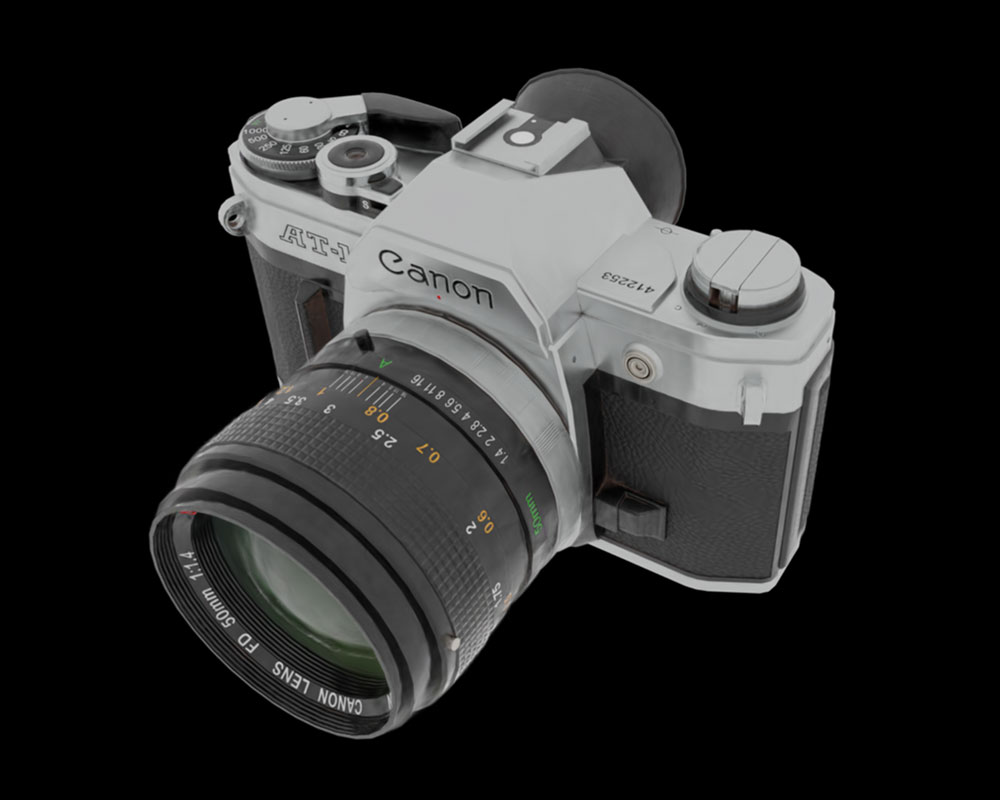
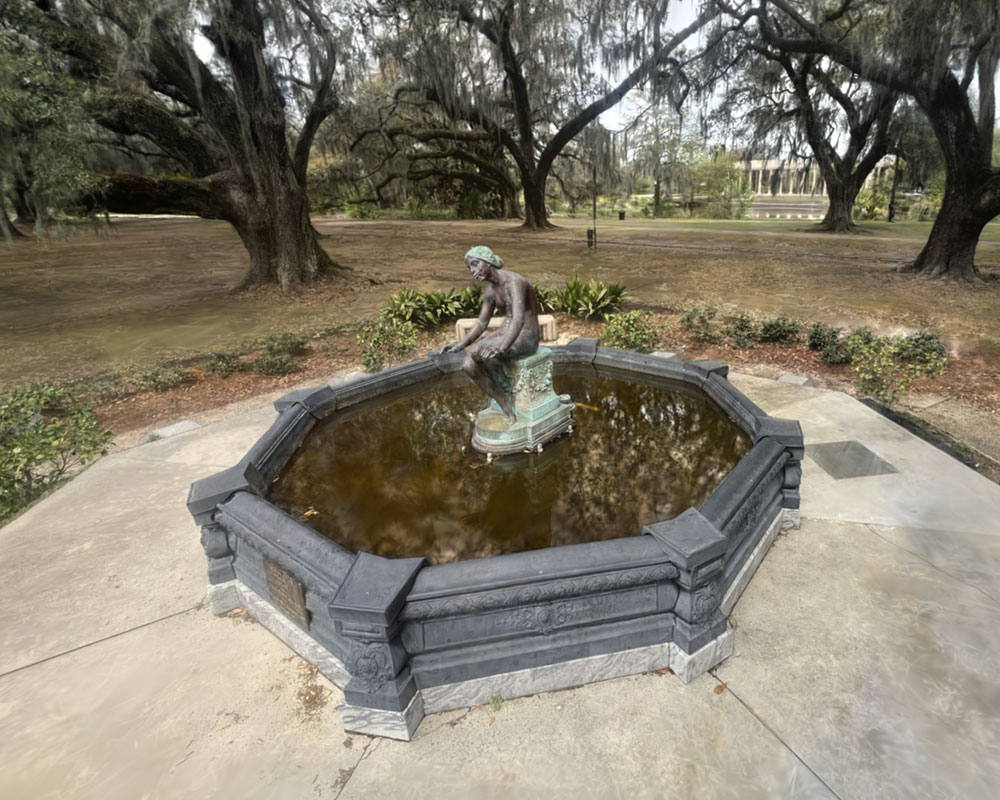
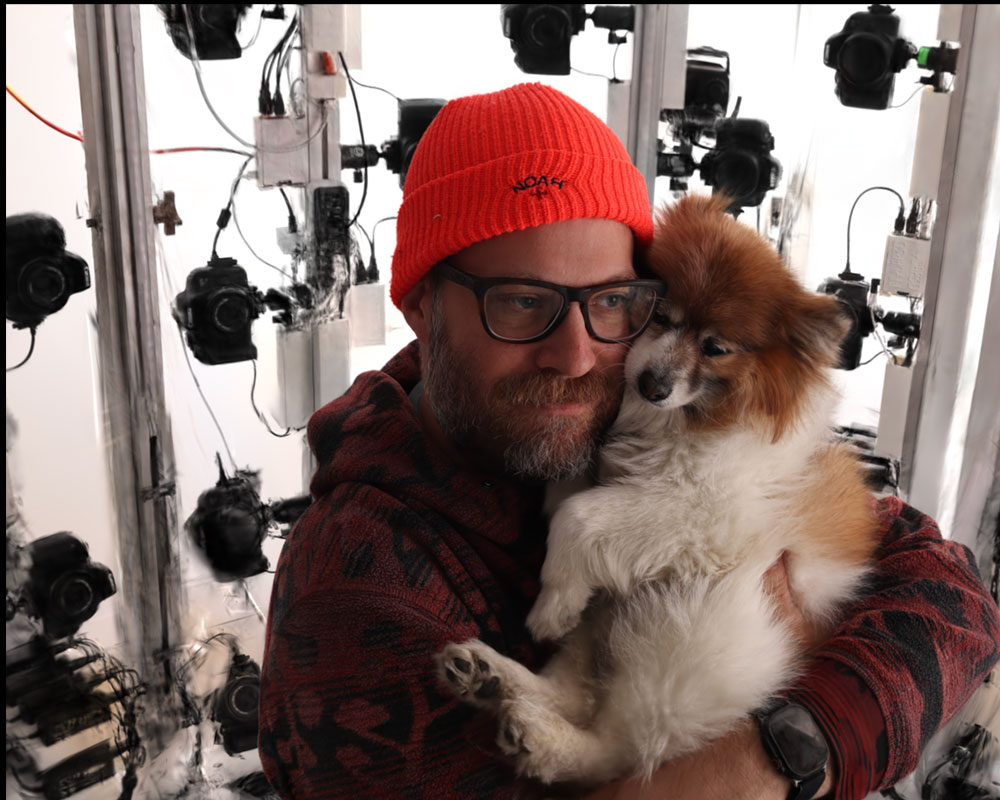
Rooms and interiors
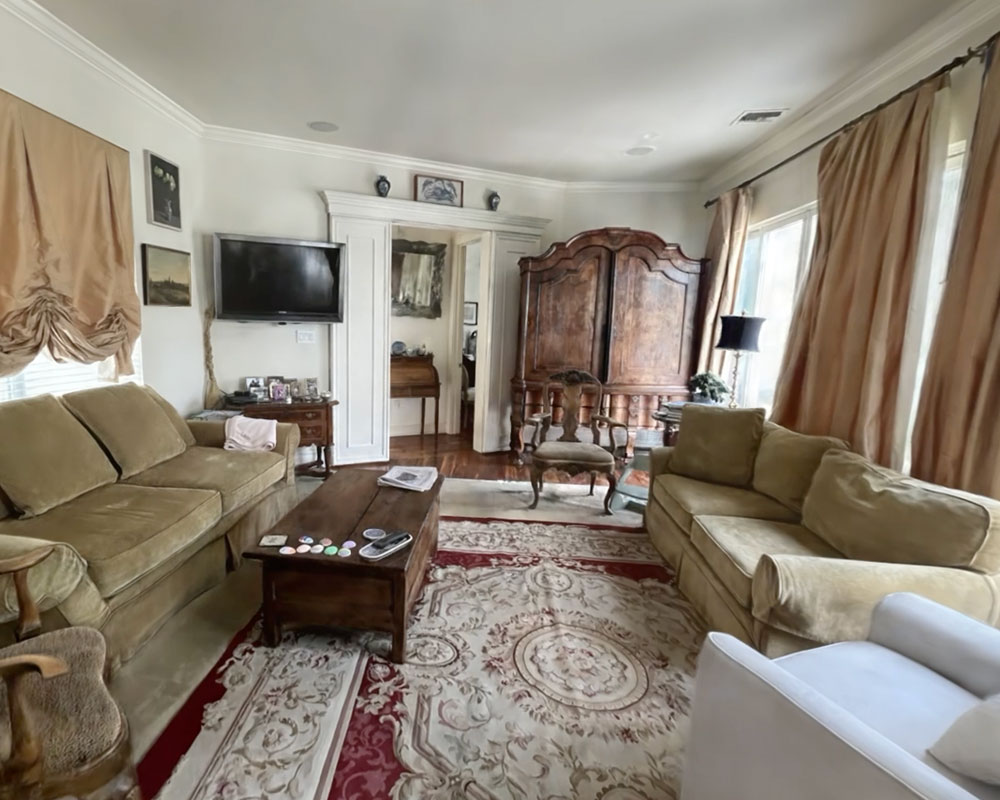
Indoor spaces are one of the strongest use cases. A Gaussian splat of a room captures soft window light, the texture of furniture, the way a rug bunches up near a door — all the small details that make a real space feel like a real space. Because splats handle reflections and complex materials better than mesh-based scans, glass tables, glossy floors, and metallic fixtures look natural instead of warped.
Common projects in this category:
- Apartment and home tours
- Studio and workshop spaces
- Gallery and exhibition walkthroughs
- Short-term rental and Airbnb-style previews
- Architecture documentation and as-built records
- Real estate listings that go beyond static photos
Rooms are also one of the most beginner-friendly subjects. The lighting is usually steady, nothing moves, and a slow walk through the space with a phone is often enough to produce a usable scan.
Objects and products
Splats are a strong fit for product captures, especially when the object has materials that traditionally trip up photogrammetry — anything reflective, glossy, semi-transparent, or with very fine detail. Hand-painted ceramics, sneakers with stitching, vintage cameras, jewelry, model kits, and sculptures all tend to look great.
Some natural projects:
- E-commerce product spins for sites and storefronts
- Collectibles, figures, and limited-run items
- Handmade and artisan goods
- Furniture and homeware
- Sculptures, statues, and museum pieces
For objects, the trick is good coverage. You want views from above, around the sides, and slightly below — usually by orbiting the object on a turntable or by walking around it at a few different heights. The cleaner the background, the easier it is to isolate the subject afterwards.
Outdoor spaces
Outdoor capture is where Gaussian splatting starts to feel a little magical. Trees, hedges, gravel paths, brick walls, and mossy stone are exactly the kinds of "messy" surfaces that traditional 3D capture has always struggled with. Splats handle them gracefully, because they are not trying to fit a clean polygon to every leaf.
Examples:
- Gardens and courtyards
- Building exteriors and facades
- Parks, plazas, and public spaces
- Ruins, monuments, and historical sites
- Construction sites and progress documentation
The main thing to watch for outdoors is changing conditions. Wind moves leaves. Clouds change the lighting from minute to minute. People and cars wander through. Capturing quickly and on an overcast day usually gives the cleanest results.
Creative and VFX work
Filmmakers, music video directors, and digital artists have been some of the fastest adopters. A captured splat can stand in as a virtual location for a shoot, a backdrop for a music video, a reference plate for visual effects, or an explorable environment for an art piece. Because the result is real, with all of the imperfections and atmosphere of a real place, it tends to read as more grounded than a hand-modeled set.
Common creative projects:
- Music videos and short films
- VFX plates and location scouts
- Virtual production references
- Digital art and 3D installations
- Game environments and indie game backdrops
Research, education, and documentation
The same qualities that make splatting useful for creators make it useful anywhere people need to record what a place actually looks like. Heritage groups have used Gaussian splats to document at-risk sites. Robotics and computer vision teams use them as realistic test environments. Educators use them to bring spatial subjects — anatomy specimens, archaeological digs, lab setups — into the classroom without having to be there in person.
- Cultural heritage and historical preservation
- Robotics and simulation environments
- Scientific and field documentation
- Education and training materials
- Insurance, inspection, and forensic records
What works well, and what is hard
If you are just starting out, the subject you choose has a huge effect on how good your first splat looks. Some subjects are very forgiving. Others will fight you no matter how careful you are.
Beginner-friendly subjects
- Well-lit rooms and interiors
- Medium-sized objects with matte surfaces
- Statues, sculptures, and architectural detail
- Plants and indoor greenery
- Furniture and decor pieces
- Overcast outdoor scenes
Trickier subjects
- Mirrors and large reflective glass
- Pure transparent objects (clear bottles, water)
- Fast-moving subjects or busy scenes
- Shiny cars under direct sunlight
- Large outdoor scenes in changing weather
- Scenes with very few visual features (blank walls, snow)
If you are completely new, a small, well-lit object on a table or a tidy, well-lit room is the fastest way to get a satisfying first result. From there, you can graduate to harder subjects as you learn what your camera and your software handle well.
When to choose splatting over photogrammetry
A common question at this point is "okay, but should I just use photogrammetry instead?" The honest answer is that it depends on what you want to do with the result.
Reach for Gaussian splatting when:
- You want the scene to look as photorealistic as possible.
- The subject has reflections, foliage, fabric, or other "messy" details.
- You plan to view, share, or embed the scene rather than edit its geometry.
- You want fast, interactive viewing with very little cleanup.
Reach for photogrammetry (or a mesh-based pipeline) when:
- You need an editable polygon model for a game, animation, or 3D print.
- You need precise measurements or CAD-style geometry.
- You plan to deform, simulate, or rig the result.
We will go deeper on this comparison in a dedicated post. For now, the rule of thumb is: splats for showing, meshes for building.
Can you put a Gaussian splat on a website?
Yes, and this is one of the most exciting parts. Several open-source and commercial web viewers can load a Gaussian splat and let visitors orbit it directly in the browser, with no plugin or app install required. That makes splats a natural fit for portfolio sites, product pages, real estate listings, and interactive blog posts. The main thing to plan for is file size — splat scenes can get large, so you will usually want to export to a compressed format (such as .spz or .sog) before publishing on the web.
Once you have a compressed file, you need a viewer to actually render it in the browser. Here are three popular options, each suited to a slightly different kind of project:
| Viewer | Best for | What it gives you |
|---|---|---|
| SuperSplat Viewer | The simplest self-hosted viewer with production-ish polish. | MIT-licensed drop-in viewer with orbit and fly cameras, fullscreen, camera flythroughs, plus AR and VR support out of the box. |
| Spark / Spark.js by World Labs | Serious Three.js-native splat rendering, multiple splats, dynamic effects, very large or streamed scenes. | A Three.js / WebGL2 renderer purpose-built for 3DGS. Spark 2.0 adds streaming level-of-detail so you can serve huge worlds without forcing visitors to download everything up front. |
| Babylon.js Gaussian Splatting | You already use Babylon.js, or want splats inside a Babylon scene. | First-class Gaussian splatting support in the Babylon engine, including compressed formats and increasingly advanced rendering features in recent releases. |
If you just want to publish a single scene with minimal fuss, SuperSplat Viewer is usually the fastest path. If you are building something more custom — a configurator, a game-like experience, or a site with many splats and other 3D content — Spark or Babylon.js give you a real engine to build on top of.
If your goal is to let other people see, explore, or share a real place or object, Gaussian splatting is probably the right tool. If your goal is to edit, animate, fabricate, or simulate, you likely still want a traditional 3D model.
Gaussian Splatting vs Photogrammetry vs NeRF
If you have spent any time reading about 3D capture, you have probably seen the same three names come up: Gaussian splatting, photogrammetry, and NeRF (neural radiance fields). All three try to solve a similar-sounding problem — turning a stack of photos into a 3D scene — but they take very different paths to get there, and the result you end up with feels different in each case.
The 30-second comparison
Each method represents the scene differently, and that single choice ripples out into everything else: how it looks, how fast it renders, how editable it is, and what kinds of projects it is good for.
| Gaussian splatting | Photogrammetry | NeRF | |
|---|---|---|---|
| Output | Cloud of soft 3D blobs (a "radiance-field-style" scene) | Polygon mesh with textures | Neural network that renders novel views |
| Best for | Photorealistic scene viewing and sharing | Editable, measurable 3D assets | High-quality novel views in research and offline pipelines |
| Main strength | Realistic look, smooth real-time viewing | Plays nicely with traditional 3D tools | Very high visual fidelity from sparse input |
| Main limitation | Hard to edit like a mesh | Struggles with shiny, transparent, thin, or fuzzy details | Often slow to render; less practical for real-time use |
| Render speed | Real-time on consumer GPUs | Real-time (it is just a mesh) | Usually slow; real-time variants exist but are more complex |
| Editability | Limited — crop, transform, clean up | Full mesh editing in Blender, Maya, etc. | Very limited — the scene lives inside a neural network |
Is Gaussian splatting better than photogrammetry?
It depends on what you want to do with the result. Gaussian splatting almost always looks better, especially on the kinds of subjects photogrammetry has historically struggled with — reflections, glass, foliage, hair, fabric, thin metal, and other "messy" real-world materials. If your goal is a scene people will view and share, splats usually win.
Photogrammetry, on the other hand, gives you a regular polygon mesh. That makes it the right choice when you actually need geometry: editing the model, simulating physics on it, animating it, taking measurements, or sending it to a 3D printer. A splat is a recipe for rendering a scene; a photogrammetry mesh is an object you can pick up and modify.
The shorthand: splats are for showing, meshes are for building.
Is Gaussian splatting replacing NeRF?
In a lot of consumer and creator workflows, yes — at least for now. NeRFs are still an active and exciting area of research, and there are NeRF variants that are fast and high quality. But for the most common task most people care about — "I have some photos or video, I want a 3D scene I can move around in right now" — Gaussian splatting tends to be the more practical answer in 2026.
The reason is mostly performance. NeRFs encode a scene inside a neural network, which is powerful but expensive to query. Gaussian splatting encodes the scene as explicit 3D primitives that a GPU can rasterize at real-time framerates. That makes it a much easier fit for interactive viewers, web embeds, mobile apps, and creative tools.
NeRFs are not going away. They are still strong for research, for very high-quality offline renders, and for capture conditions where they outperform splats. But for the everyday "phone video to 3D scene" loop, splatting has quickly become the default.
Which one should you try first?
If you are new to 3D capture and just want to see something cool come out of your photos, start with Gaussian splatting. It is the most forgiving of the three, gives the most photographic-looking results, and the tooling is the easiest to use. Most people get a satisfying first scene on their first or second try.
Pick a method based on your project:
- Website, product page, or interactive embed — Gaussian splatting. Real-time viewing in a browser is the killer use case.
- Real estate listings or virtual tours — Gaussian splatting. Splats handle interiors, glass, and reflections far better than photogrammetry.
- Game asset, animation rig, or 3D print — photogrammetry. You need an editable mesh.
- Measurable architectural or engineering capture — photogrammetry, possibly combined with LiDAR. Splats are not built around accurate metric geometry.
- Research, offline VFX, or experimental high-fidelity captures — NeRFs are still a strong choice, especially when render speed is not a constraint.
The good news is that these methods are not really rivals so much as different tools for different jobs. It is increasingly common to use more than one in the same project — for example, capturing a location as a splat for visual reference, while building a clean mesh of the hero object with photogrammetry for animation work.
Gaussian splatting wins on photorealism and real-time viewing. Photogrammetry wins on editable, measurable geometry. NeRFs are still excellent for high-end offline renders. For most beginners and creators, splatting is the easiest place to start.
What Do You Need to Create a Gaussian Splat?
One of the nicest things about Gaussian splatting is how short the requirements list is. You do not need a research-grade rig, a LiDAR scanner, or a custom camera array. Most people already own everything they need. The whole workflow boils down to four essentials:
- Photos or video of the subject you want to capture
- A camera to capture them with
- Software that can train and view the scene
- A computer with a capable GPU
That is it. Each of these is worth a closer look, but none of them require anything exotic.
1. Input: photos or video
Gaussian splatting needs something to learn from, and that something is a set of images that show your subject from many angles. There are two common ways to provide them:
Photos
- You take a series of overlapping still photos around the subject.
- More control over exposure, focus, and sharpness.
- Easier to slow down and frame each shot.
- Great for objects, products, and careful captures.
Video
- You record a slow walk around the subject.
- The app extracts frames automatically.
- Much faster to capture, especially for rooms and large scenes.
- Forgiving for beginners — easier than nailing dozens of stills.
Both approaches work, and most modern training apps accept either. For most beginners, video is the easier starting point — you press record once, walk smoothly around your subject, and let the software pull frames out for you. Photos give you more deliberate control once you know what you are doing.
How many you need depends on the size of the scene, how much overlap you have, and how much detail you want. A small object on a table might be fine with a few dozen sharp photos or a 30 second video. A whole room often needs a few hundred frames.
2. A camera
You do not need a special camera for Gaussian splatting. What matters is that the images are sharp, well-exposed, and overlap with each other. Most ordinary cameras can do this:
- An iPhone or modern smartphone — the most common starting point. The camera in any recent iPhone is more than good enough, and shooting in 4K video gives the app plenty of frames to work with.
- A mirrorless or DSLR camera — useful when you want maximum sharpness, more control over exposure, or shallow depth-of-field captures of small objects.
- A drone — great for outdoor scenes, building exteriors, and capture paths that are hard to walk.
- An action camera — handy for tight indoor spaces where you cannot easily move with a phone or large camera.
The general rule is: if a camera produces sharp, well-lit, overlapping images of a subject, it can produce a Gaussian splat. Phones happen to be excellent at all of those things, which is a big part of why splatting feels so accessible.
3. A subject and a bit of light
This one is easy to overlook because it sounds obvious, but it makes a huge difference to your results. You want a subject that does not move and lighting that does not change while you are capturing.
- Stationary subjects. People, pets, swaying branches, and traffic all confuse the reconstruction. Pick subjects that stay put.
- Steady lighting. Indoor light, overcast outdoor light, or a shaded outdoor spot all work well. Avoid sudden changes between sun and shadow during the capture.
- Enough texture and detail. Gaussian splatting needs visual features to lock onto. Big blank walls, flat snow, or featureless surfaces are harder than richly textured ones.
We will go deeper on capture technique in the next section. For now, just know that the easiest first projects are usually a tidy, well-lit room or a medium-sized object on a table.
4. Software
You need a few different pieces of software to go from photos to a finished splat, though many apps roll them into a single interface:
- A training app. This is the engine. It estimates camera positions and trains the Gaussian splat from your input.
- A viewer. Once the splat is trained, you need something that can render it. Many training apps include a built-in viewer; there are also dedicated desktop and web viewers.
- Export tools. If you want to share or embed your splat, you will export it to a format like
.ply,.spz, or.sog. Different viewers and engines prefer different formats. - Optional cleanup or editing tools. Most splats benefit from a quick pass to crop the bounds, remove floating artifacts, or mask out unwanted background.
5. A computer to run it on
This is the requirement that catches some beginners off guard. Training a Gaussian splat is GPU-heavy work. You can absolutely do it on a personal computer, but you do need one with a reasonably modern graphics card.
Two broad options exist:
- Local training on your own machine. A recent gaming PC with an NVIDIA GPU, or a modern Mac with Apple Silicon, can train splats entirely on-device. Nothing leaves your computer. You control quality, speed, and privacy.
- Cloud training services. Several services let you upload your photos or video and train the scene on their hardware ( e.g. polycam ) This is convenient if your own computer is not up to the task, but it usually means uploading large files and trusting a third party with your footage.
For Mac users specifically, Apple Silicon's unified memory architecture and powerful GPUs make local training surprisingly capable. 3D Splat App is built around that workflow — drop in photos or video, train on your Mac's GPU, and get a finished splat without uploading anything.
Quick answers
If you are skimming, here are the most common "do I need…?" questions, answered fast.
| Question | Short answer |
|---|---|
| Can I make a Gaussian splat with just an iPhone? | Yes. A slow video around your subject is often all you need to provide. You will still need a computer or cloud service to do the training. |
| How many photos do I need? | It depends on subject size and overlap. As a rough guide, a small object can work with 30–80 sharp photos; a room often needs 200–500 frames. |
| Is video easier than photos? | For most beginners, yes. A slow, smooth video gives the app plenty of overlapping frames to work with and removes the guesswork of timing each shot. |
| Do I need a LiDAR scanner? | No. Gaussian splatting is built around ordinary images. LiDAR can help in some pipelines, but it is not required. |
| Do I need an internet connection? | Only if you are using a cloud service. Local training apps run entirely offline once installed. |
| Can it run on a Mac? | Yes. Modern Apple Silicon Macs are well-suited to training and rendering Gaussian splats locally. 3D Splat App is one option built specifically for that. |
If you have a phone, a subject, and a recent computer, you have what you need. Everything else is just choosing which software and workflow you prefer.
Beginner Tips for Better Gaussian Splats
After a few captures, one thing becomes clear quickly: your splat is only as good as your capture. The same training app, the same scene, two different shoots — wildly different results. A clean capture can deliver something gallery-ready on the first try. A rushed one can leave you with a cloudy, hole-filled mess that no amount of training will save.
The good news is the rules are simple, and they are mostly about how you move the camera rather than what camera you use. Here are the habits that make the biggest difference for beginners.
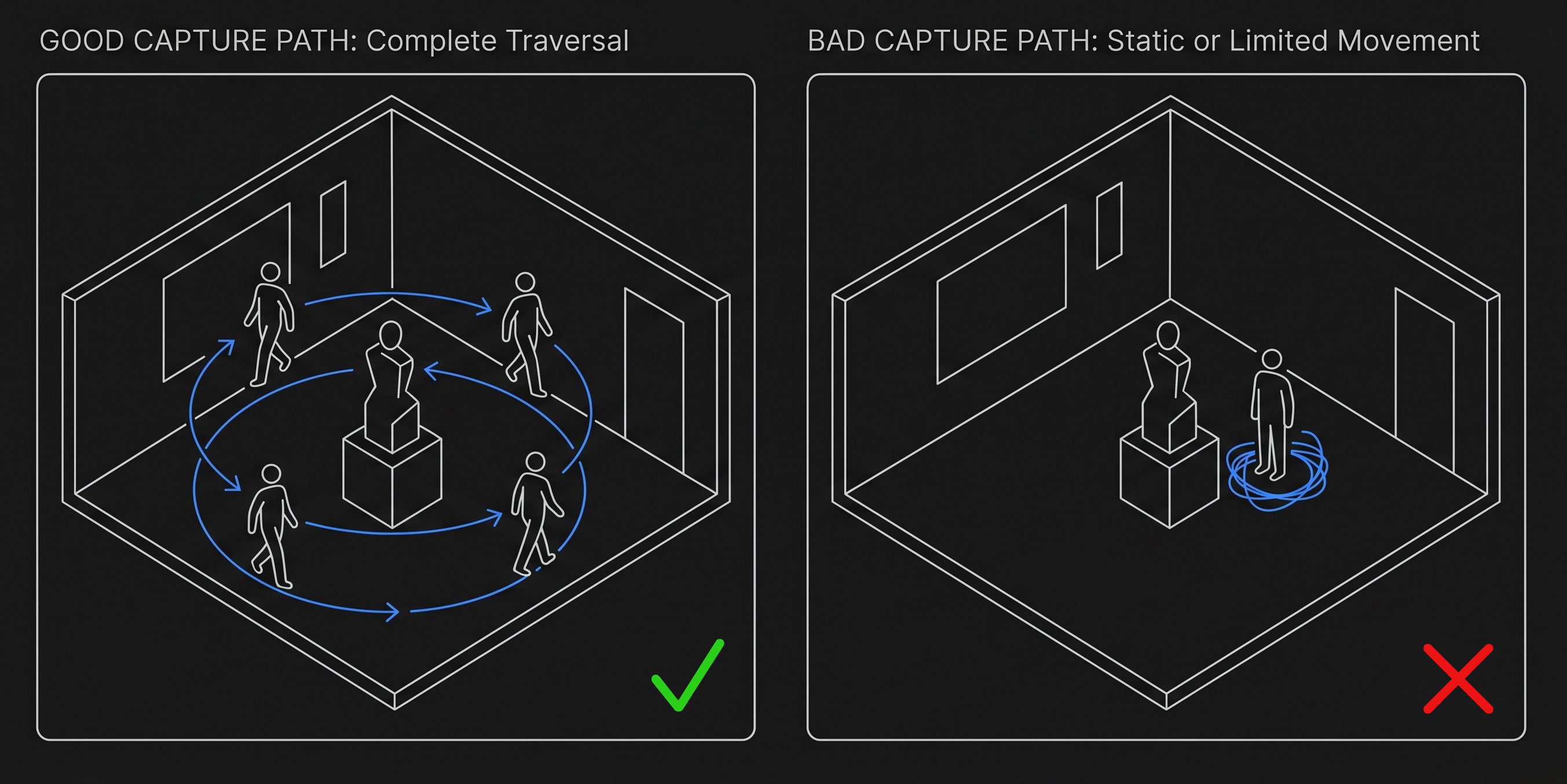
Move slowly and smoothly
This is the single most common mistake beginners make. If you walk too fast or whip the camera around, you get motion blur — and motion blur is poison for Gaussian splatting. Blurred frames give the software unreliable information about edges and details, so it cannot place its splats accurately.
A useful rule of thumb: pretend you are filming a real estate walkthrough or a slow museum pan. Move at the kind of pace where you could comfortably read a small sign on the wall as you pass. If you cannot, you are moving too fast.
Keep your subject in frame
Whatever you are capturing — an object, the corner of a room, an entire backyard — try to keep the same subject visible across most of your frames. Wildly panning away to look at the ceiling or down at your feet leaves the software with disconnected views that are hard to align.
The cleanest captures often look almost boring while you are recording: a steady orbit or walk where the subject stays roughly centered, with only as much tilt or pan as you need to keep it in view.
Build in overlap
Overlap is the most important technical idea in any photo-based 3D capture. Each part of your scene should appear in multiple frames, from multiple angles. That is what lets the software triangulate where things actually are in 3D space.
A simple way to think about it: pick any random spot on your subject. Are there at least three or four input frames where that spot is clearly visible from different angles? If yes, you are in good shape. If a particular area only appears in one or two frames, expect it to be soft, blurry, or full of artifacts in the final splat.
For video, slow continuous motion gives you overlap automatically. For photos, the rule of thumb is to step a small amount between each shot — small enough that the new view looks "just a little different" from the previous one.
Vary your angles and heights
A capture taken entirely at eye level is often disappointing. The top of an object, the underside of a chair, the floor near a sofa — none of those areas will be reconstructed well unless you actually point the camera at them.
- For objects: walk around the subject at three rough heights — high (looking down), eye level, and low (looking up). Extra "around the back" angles help even more.
- For rooms: follow a path that hits all the corners, then make a second pass focused on important furniture and details. Look up occasionally for ceilings, down occasionally for floors.
- For outdoor scenes: if the subject is large (a building, a courtyard), include some wider establishing angles as well as close passes of the most interesting details.
You do not need to be rigorous about it. Just remember that the splat can only show you what your camera saw. If you never looked up, the ceiling will be a void.
Keep the lighting consistent
Gaussian splatting assumes the world looks roughly the same in every frame. Sudden lighting changes — sun popping in and out from behind clouds, an automatic light switching on, a flash firing on some shots and not others — confuse the reconstruction and produce strange shimmer or color artifacts.
The easiest way to avoid trouble is to pick a moment when the light is steady, then capture quickly. Indoors, that usually means turning on the lights you want and leaving them alone for the whole shoot. Outdoors, an overcast day is your best friend; bright direct sunlight with hard shadows is the worst case.
Watch out for things that move
If something moves between frames, the splat does not know which version is correct, so it tends to either smear the moving thing into ghostly streaks or sprinkle floating artifacts ("floaters") around the scene.
The usual culprits:
- People walking through your frame
- Pets following you around
- Cars driving past in the background
- Tree branches and leaves in even a light breeze
- Water — fountains, ponds, rain, a running tap
- Curtains or papers shifting in a draft
- Your own hand or shadow drifting across the subject
You cannot eliminate all of this — outdoor captures in particular always have some movement. But the stiller your scene is during the shoot, the cleaner the splat will be.
Pick a forgiving first subject
If this is your first or second splat, do not start with the hardest possible subject. Some scenes are very forgiving and almost guarantee a satisfying result. Others will fight every habit you are still building.
Great first subjects
- A tidy, well-lit room
- A medium-sized object on a table with a plain background
- A statue or sculpture in even light
- A planter or potted plant indoors
- A backyard or courtyard on an overcast day
Save these for later
- Mirrors and large sheets of glass
- Pure transparent items (clear bottles, water)
- Shiny cars in direct sun
- Crowded public spaces
- Scenes with very few visual features (snow, blank walls)
Common problems and what they usually mean
If your first splat does not look how you hoped, the cause is almost always something in the capture rather than something in the software. Here are the symptoms beginners run into most often and what tends to be behind them.
| If your splat looks like… | The capture probably had… |
|---|---|
| Blurry or soft details | Motion blur from moving the camera too quickly, low light, or out-of-focus frames. |
| Holes or missing chunks | Areas that were never captured from enough angles. The fix is more passes from different heights and directions. |
| Cloudy or foggy edges | Not enough overlap, or wild pans away from the subject. More steady orbiting, fewer detours. |
| Floating "blobs" in mid-air | Something moved during the capture — a person, a branch, a reflection — and the splat tried to reconcile both versions. |
| Strange shimmer or color shifts | Lighting changed during the shoot. Try again with steadier light and a faster pass through the scene. |
| Ghostly streaks where a person or pet was | A subject that moved between frames. Either keep them perfectly still or wait for them to leave the shot. |
The encouraging part is that capture is a skill you build very quickly. After your first couple of splats, you start naturally moving slower, framing more deliberately, and walking around the subject at different heights without thinking about it. By your third or fourth try, most of these tips become automatic.
Move slowly, keep your subject in frame, build in lots of overlap from different heights, hold the lighting steady, and avoid anything that moves. Master those five habits and your first splats will already be ahead of most beginners' work.
What Are the Limitations of Gaussian Splatting?
Gaussian splatting is genuinely impressive, but it is not magic, and it is worth understanding what it cannot do as well as what it can. Some limitations come from the technique itself — they will show up no matter how clean your capture is or how much GPU you throw at it. Others are practical issues around file size, performance, and tooling that are slowly improving but are not fully solved yet.
Here is an honest look at where splatting still falls short today, and what you can do about each one.
You cannot edit it like a traditional 3D model
We touched on this in an earlier section: a Gaussian splat is a cloud of soft 3D blobs, not a polygon mesh. That makes it excellent for viewing and frustrating if you wanted to push vertices around, sculpt, retopologize, or rig the result. Modern apps let you crop, mask, transform, and lightly clean up splats, but anything resembling the day-to-day editing freedom of Blender or Maya is still missing.
If you imagined splatting as "free 3D scan I can drop into my normal pipeline," temper that expectation. It is closer to a volumetric photograph than to a sculpted asset.
The geometry is approximate, not precise
Splats are optimized to look right from the camera angles you captured, not to match the world's geometry to the millimeter. That makes them excellent for visual fidelity and a poor fit for jobs that depend on accurate measurements — floor plans, CAD models, engineering documentation, or anything you plan to fabricate. Two splats of the same room can both look photographic and disagree on how wide a doorway is by several centimeters.
3D printing is the most common version of this question. Because there is no surface to print, you cannot send a splat to a printer the way you would a mesh. You can convert a splat into a mesh using surface extraction tools, and results are improving, but the converted mesh is usually rougher than what you would get from a photogrammetry pipeline aimed at print from the start. If your project needs metric accuracy or fabrication, a splat alone is rarely the right answer.
Artifacts are part of the deal
Even a clean, careful capture can produce artifacts that have nothing to do with technique. The two you will see most often:
- Floaters — small, ghostly clumps of splats hovering in empty space, especially around the edges of a scene or near reflective surfaces.
- Cloudy halos — soft, hazy regions around objects, particularly along their silhouettes against the background.
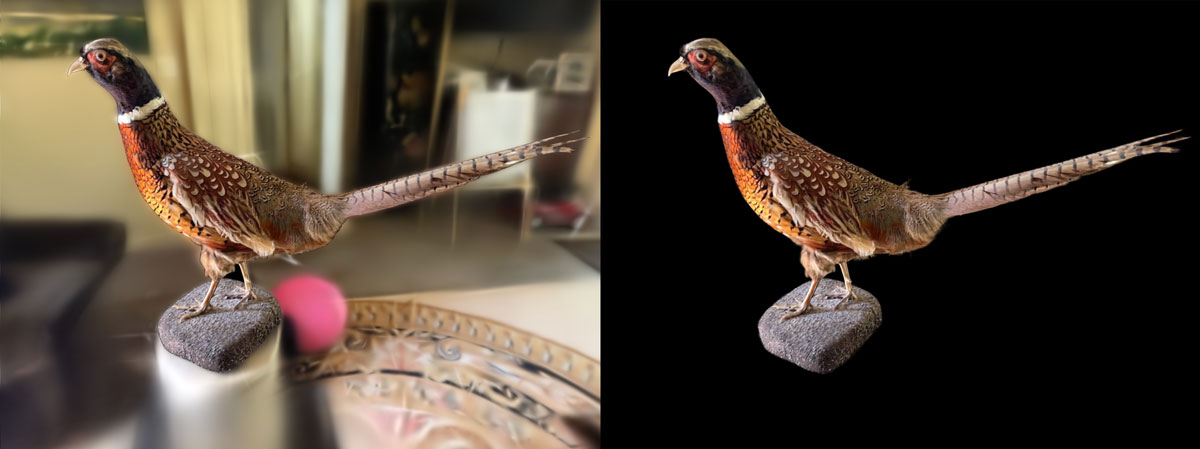
These are partly intrinsic to how the technique works. Splats are optimized to match the views you captured; what is in between those views, or just outside them, is less constrained, and the model sometimes fills those gaps with nonsense. Better captures help. More training iterations help. Post-process cleanup helps a lot. But you should expect to do some cleanup on most splats — it is part of the workflow, not a sign you did something wrong.
Some materials and subjects are still hard
Gaussian splatting handles "messy" real-world materials beautifully — fabric, foliage, rough stone, hair, fur. But a handful of subjects still trip it up no matter how careful you are:
- Mirrors and large reflective glass — the splat tries to reconcile the reflected world with the actual world and tends to produce a confused mush in the reflection.
- Pure transparent objects — clear glass bottles, water, certain plastics. There is no opaque surface to anchor the splats to.
- Repetitive textures — long brick walls, tiled floors, rows of identical chairs. The camera-alignment step has a hard time telling one tile from another, which can throw off the entire reconstruction.
- Moving subjects — even a slight breeze in tree branches or a person shifting their weight leaves a trail of artifacts.
These are limits of the technique, not just of your shoot. Research is steadily chipping away at each of them, but for now they are worth designing around rather than fighting.
File sizes and web delivery
A finished splat scene often contains several million Gaussians, and each one stores position, size, orientation, color, and opacity. Raw .ply exports of a detailed scene can easily run into hundreds of megabytes, sometimes more. That is fine on disk and fine in a desktop viewer, but it becomes a problem the moment you want to publish on the web.
Compressed formats like .spz and .sog exist specifically to make splats web-friendly, often shrinking files by an order of magnitude with little visible quality loss. Most modern viewers support them. Even with compression, splats are heavier to render in a browser than a typical 3D model — on a recent laptop or phone, a well-compressed scene plays smoothly, but on older hardware larger scenes can stutter or fail to load.
If you are publishing splats on a public website, plan to compress aggressively, show a poster image while the scene downloads, and set reasonable expectations for older devices. This will keep improving as browsers, GPUs, and viewers catch up, but for now treat web splats a little like 4K video: amazing where it works, but not free.
Training takes time and hardware
Training a splat is not instant. On a recent Mac or a gaming PC, a small object might train in a few minutes; a detailed room can take twenty minutes to an hour; and HD-quality reconstructions of larger scenes can run for several hours. Older or under-powered machines may struggle to train at all, or run out of memory on bigger scenes.
You are also working with files that take real disk space. Frame extraction from a long video, plus training intermediates, plus the final scene, can quickly add up to several gigabytes. Plan accordingly, especially on a laptop with a smaller drive. Most apps now expose quality presets — fast previews vs longer HD trains — so you can scope the time investment to the project.
Splats are static, for now
The current generation of Gaussian splatting is built around static scenes — a moment frozen in time. There is progress being made on dynamic and animated splats ( e.g. check out Gracia to view some animated splats ) Reliable, easy-to-use tools for capturing a person dancing or a pet running around in 3D are not there yet for most users. If your project needs motion, you are still better off with traditional video or rigged 3D animation.
The tooling is still catching up
Compared to mesh-based pipelines, the splatting ecosystem is young. Game engines and DCC tools are adding native support, but coverage varies by version and platform. Format fragmentation is real — .ply, .splat, .spz, .sog, and others all coexist, and not every viewer reads every format. Expect a little friction when you move a splat between tools.
The trajectory is good. Three.js (via Spark), Babylon.js, PlayCanvas, Unity, and Unreal all have splat rendering in some form, and the file formats are starting to consolidate. But if you are coming from a polished mesh pipeline, the rougher edges of the splat ecosystem will be noticeable.
It does not replace a 3D artist
It is tempting to look at a great Gaussian splat and assume it makes hand-crafted 3D work obsolete. It does not. Splats are extraordinary at capturing what something looks like, but a film prop, a game character, an animated logo, a CAD assembly, or a stylized art piece all need things that a splat cannot give you: clean topology, deformation rigs, art direction, simulation, or precise design intent. The most realistic future is probably one where splats sit alongside meshes and other 3D primitives — not one where they replace any of them.
What you can do about most of these
The reassuring part is that nearly every limitation above has at least a partial workaround. A few habits cover most of what you will run into:
| Limitation | What you can do about it |
|---|---|
| Floaters and cloudy edges | Crop the bounds tightly, run cleanup tools to remove obvious junk, add more passes from weak angles, or retrain a little longer. |
| Large file sizes | Export to a compressed format like .spz or .sog before sharing. Reserve raw .ply for archive copies and pipelines that need it. |
| Web playback on older devices | Compress aggressively, ship a poster image while the scene loads, and design fallbacks for browsers or GPUs that cannot handle the full scene smoothly. |
| Tricky materials (mirrors, glass) | Avoid them when you can. When you cannot, mask them out, isolate the main subject, or accept the artifacts as part of the look. |
| Geometry that needs to be precise | Pair splats with photogrammetry or LiDAR for the parts that need real measurements, and use the splat purely for visualization. |
| Long training times | Use a fast preset for previews and quick iteration, and only run a full HD train once you are happy with the capture and crop. |
The single biggest quality-of-life upgrade once you start running into these limits is having a workflow where you can preview, mask, crop, and retrain without leaving your machine — and without uploading large datasets every time you want to try one more thing. 3D Splat App is built around that local, iterative loop on macOS, but the broader point holds regardless of the tool you pick: expect to iterate, and choose software that makes iteration cheap.
Gaussian splatting is not a replacement for meshes, photogrammetry, or 3D artists. It is a new kind of 3D representation with its own strengths and its own rough edges. Knowing the limits up front — editability, precision, artifacts, file size, training time — turns most of them from frustrations into things you simply plan around.
Can You Make Gaussian Splats Locally?
Yes — and increasingly, that is where most of the action is. For the first year or two after Gaussian splatting hit the mainstream, training a scene generally meant either renting a cloud service or wrestling with a research codebase on a Linux box with a high-end NVIDIA GPU. Today, you can train a respectable splat on a recent laptop, fully offline, in roughly the time it takes to drink a cup of coffee.
That changes the math on a lot of things — cost, privacy, iteration speed, what kinds of projects are practical — so it is worth understanding both options and where each one shines.
What "cloud" splatting means
Cloud-based services handle the entire pipeline on their servers. You upload your photos or video, their backend runs camera alignment and training, and a few minutes to a few hours later you get a viewable scene back. The pitch is simplicity: you do not need to know what a GPU is, you do not need to install anything technical, and your laptop fan never spins up. Polycam, Luma AI, and several others all work this way.
The tradeoffs are equally simple:
- You usually pay. Most cloud services have a free tier — often capped at a small number of scans per month, lower quality, or restricted output formats — and a paid plan that unlocks the rest. Pricing typically runs from around $10–$30 per month for hobbyist tiers, with higher tiers for professional or commercial use. If you only make a splat or two a year, the free tier may be enough; if you make them weekly, the costs add up.
- You upload everything. A typical capture is several hundred photos or a multi-gigabyte video. Uploading that on a slow or capped connection is annoying at best and a non-starter at worst.
- Your footage lives on their servers. For a casual scan of your living room, that is fine. For a client's home, an unreleased product, a research site, or anything covered by an NDA, it can be a real problem.
- You are at the mercy of their queue. When the service is busy, your "30-minute" job can take hours. When the service goes down or shuts down, your workflow goes with it.
- You get whatever quality settings they expose. Most cloud apps have a small set of presets and few knobs. If the default is not quite right for your scene, your options are limited.
None of this makes cloud services bad — for a lot of casual users they are the fastest path to a usable splat. They are just optimized for convenience, and you pay for that convenience in money, privacy, and control.
What "local" splatting means
Local training runs entirely on your own machine. Your photos or video stay on your drive, the training happens on your GPU, and the finished scene lands in a folder you control. No upload, no per-scene cost, no queue, no internet connection required after the app is installed.
The benefits are roughly the mirror image of the cloud tradeoffs:
- No per-scan cost. Once you have the software, training is effectively free. You can iterate as much as you want, retrain a scene ten times to dial in the quality, and not think about a billing meter.
- Privacy by default. Nothing leaves your computer unless you explicitly export and share it. This matters more than people expect — for client work, real estate captures of occupied homes, and anything you would rather not park on a third-party server.
- Faster iteration on big captures. Once your footage is on disk, you skip the upload entirely. For multi-gigabyte video this often saves more wall-clock time than the training itself.
- Full control over settings. Local apps tend to expose more of the underlying parameters — iteration counts, resolution, masking, cropping — so you can push past the defaults when a scene needs it.
- Works offline. You can train on a plane, in a basement, at a remote shoot location, anywhere with power.
The honest catch: you do need a computer that can handle it. Which brings us to the question every new splatter eventually asks.
Do I need a beefy NVIDIA GPU?
Short answer: no, not anymore. Long answer: it depends on which app you use.
Many of the original research codebases and a lot of community tooling do assume an NVIDIA GPU because they are built on CUDA, NVIDIA's proprietary GPU compute platform. If you are running one of those projects directly, you will need an NVIDIA card — typically with at least 8 GB of VRAM for small scenes, 12–24 GB if you want headroom for larger captures. That is the world a lot of online tutorials still describe.
But CUDA is not the only way to train a splat. Modern apps built on Metal (Apple's GPU framework) can train Gaussian splats natively on Apple Silicon Macs — no NVIDIA hardware in sight. Apple Silicon is genuinely well-suited for this work: the unified memory architecture means the GPU can address all of system RAM directly, so a MacBook with 16–32 GB of memory can comfortably train scenes that would push a 12 GB NVIDIA card to its limits. M1 and later Macs all qualify; the more memory and the newer the chip, the bigger the scene you can comfortably train.
So the practical answer for most people:
- If you have a recent Mac (M1 or later), you can train splats locally without buying any new hardware. Look for an app built on Metal.
- If you have a Windows or Linux PC with a recent NVIDIA GPU (RTX 30-series or newer is a good baseline), you have plenty of options across both research tools and consumer apps. Checkout Lichtfeld studio - a solid Windows/Linux open source splatting app.
- If you have an older PC, an Intel Mac, or a machine with only integrated graphics, local training is still possible for small scenes but will be slow. A cloud service may be the more practical choice until you upgrade.
Side by side
The two approaches are not really better or worse than each other — they are tuned for different priorities.
| Local training | Cloud training | |
|---|---|---|
| Cost per scene | Free after the app is installed. | Free tier is usually limited; serious use is $10–$30+ per month. |
| Hardware | Requires a capable GPU — Apple Silicon Mac or recent NVIDIA PC. | Any computer that can run a browser. |
| Upload time | None. Files stay on disk. | Can be significant for multi-gigabyte video. |
| Privacy | Footage never leaves your machine. | Footage is uploaded to a third-party server. |
| Iteration speed | Retrain freely; no queue, no per-run cost. | Each retrain costs time and often credits. |
| Works offline | Yes. | No. |
| Setup effort | Install an app. | Sign up, click upload. |
| Best for | Frequent users, client work, sensitive captures, large datasets. | One-off scans, casual users, machines without a capable GPU. |
Why local matters more than it sounds
On paper, "I do not want to upload a video" sounds like a minor preference. In practice, the local workflow changes how you work with splats, because iteration becomes free.
When every retrain costs cloud credits and a fresh upload, you tend to commit to one capture, one setting, one result. When retraining is free and instant, you start treating splats the way photographers treat RAW files — you experiment. You try different masks, different crops, different quality presets. You re-shoot when something looks off and you immediately know it. That feedback loop is where the difference shows up in the final scenes, not in any single benchmark.
The other reason is one a lot of users only notice once it bites them: you do not always know in advance what footage you would rather not put on someone else's server. Real estate scans capture the inside of someone's home. Product captures may include unreleased designs. Research scans may involve restricted environments. Heritage scans may be subject to permitting rules. A local workflow sidesteps all of that by default.
If you are on a Mac
If you are on a Mac, local Gaussian splat training is in a particularly good spot right now. The combination of Apple Silicon's GPU and unified memory turns out to be very well-matched to splat training, and there is finally consumer software that takes advantage of it.
3D Splat App is built specifically for this workflow: drop in photos or a video, let it handle camera alignment and training on your Mac's GPU, preview the result, and export to .ply, .spz, or .sog. It is free on the Mac App Store, runs entirely on-device, and is a reasonable place to start if you want to try the local approach without committing to anything more elaborate.
Cloud splatting is the easiest way to get one scene out of one capture. Local splatting is the better way to actually get good at splatting. If you have a recent Mac or a machine with a modern NVIDIA GPU, you do not need a cloud service — and you do not need to pay anyone — to make great Gaussian splats.
How Do You View or Share a Gaussian Splat?
Once a scene finishes training, it lives on your disk as a single file (or a small folder of related files). To actually do something with it — show a client, embed it on your website, hand it to a 3D artist, or just orbit it on the couch — you need to know which formats exist, which viewers read which formats, and what to expect on different devices.
The good news: this is one of the parts of the splat ecosystem that has improved the most in the past year. A finished splat is now genuinely easy to share, and almost everyone you send it to can view it without installing anything.
The file formats, in plain English
The splat world is not as standardized as the mesh world, with its long-trusted .obj and .gltf, but a handful of formats have emerged and most viewers support a useful subset of them. The short list:
.ply— the original. It is a generic point-cloud format that the early Gaussian splatting research adopted, and it remains the most universal. It is also the largest: a detailed scene can run from tens of megabytes to over a gigabyte. Use it as your archive format, and as a fallback when you are not sure what the recipient supports..ply(compressed) — a quantized variant of the above. Smaller than raw ply, larger than the dedicated compressed formats below, and supported almost everywhere ply is. A reasonable default if you want a single format that works in most places..spz— Niantic's compressed splat format, designed for streaming on the web. Files are typically 5–10x smaller than raw ply with no visible quality loss, and most modern web viewers read it natively..sog— Self-Organizing Gaussians. An even more aggressive compression scheme aimed at low-bandwidth and mobile playback. Often produces the smallest file of the bunch..splat— an older community format. Still seen in the wild, but newer formats are usually a better choice for new exports.
You do not need to memorize which is which. A practical rule of thumb: archive in .ply, publish on the web in .spz or .sog, and check the docs of any specific tool or engine you are exporting to.
Sending a splat to one other person
Easy case first: you have a splat, and you want a friend, client, or collaborator to be able to spin it around. You have two practical options.
- Send a file. Export to a compressed format such as
.spzor.sog, drop it in any cloud storage or file-transfer service, and send the link. The recipient opens it in a free web viewer like SuperSplat — no install, no account. - Send a hosted link. Some services let you upload a splat and get back a public URL with a built-in viewer. This is the most no-friction option for non-technical recipients: they click a link, the splat opens in their browser, and they can orbit it on the spot.
Either approach works on phones, tablets, laptops, and desktops. There is no plugin to install, no special account on the recipient's side, and no platform lock-in.
Embedding a splat on your own website
This is where things get fun. Modern web viewers can stream a Gaussian splat into a browser canvas and let visitors orbit it directly on your page — no plugin, no app, no download. A handful of open-source libraries make this surprisingly approachable:
- Spark — a Gaussian splat renderer that drops into a Three.js scene. If your site already uses Three.js, this is often the path of least resistance.
- Babylon.js — has built-in support for Gaussian splats. A good fit if you are already in the Babylon ecosystem.
- PlayCanvas / SuperSplat — PlayCanvas has both a hosted editor and a built-in splat viewer. SuperSplat in particular is a free web app that can view and edit splats, and it is a reasonable place to send people if you do not want to ship your own viewer.
For a basic embed, a typical recipe is: export your scene to .spz or .sog, host the file on your own server or a CDN, and load it with a viewer library inside a <canvas>. A working embed can be a few dozen lines of code.
Two practical things to plan for:
- File size dominates load time. Even a well-compressed scene is several megabytes, sometimes tens. Show a poster image while the file downloads, lazy-load the viewer below the fold, and consider a "tap to load 3D" affordance so you are not blowing through visitors' data plans automatically.
- Mobile works, but test it. Recent phones can absolutely render compressed splats at a smooth frame rate. Older phones will struggle on bigger scenes. A scaled-down version of the splat, or a fallback to a turntable video on low-end devices, goes a long way.
Desktop viewers
Sometimes you want something richer than a web viewer — for client review, for adjusting crops and bounds, or just because you would rather scrub through a scene in a real app than in a browser tab. There is a growing list of free desktop viewers and editors that can open .ply and compressed splat files and let you fly around with proper camera controls.
3D Splat App is one of them on macOS — it both trains and views splats on-device, so the same app you used to make the scene is also the one you fly around in. On Windows there are several similar tools, and on Linux the situation is improving quickly. For most use cases, picking the viewer that ships with whichever training app you already use is the lowest-friction choice.
Game engines and creative tools
If your project lives inside a game engine or a 3D DCC tool, splat support is finally landing in most of the obvious places — though coverage varies and some pieces are still maturing.
- Unity and Unreal Engine both have splat rendering plugins with active development behind them. You can drop a splat into a scene, light around it, and use it as a backdrop for animation, virtual production, or interactive experiences.
- Three.js, Babylon.js, and PlayCanvas all have first-class splat support on the web side, as covered above.
- Blender and other DCC tools are catching up via community add-ons, but native, fully-featured support is still the exception. Expect more friction here than in the engines or in web viewers.
If your end target is a specific engine or tool, check its docs before exporting. Some prefer a particular format, some have their own ingestion pipeline, and some still expect the original .ply with a few specific tweaks.
Mobile and headset viewing
Splats render surprisingly well on a recent phone. Both iOS and Android browsers can handle a properly compressed scene at a smooth frame rate on most mid-range devices from the past few years. Native mobile apps — such as the viewers built into capture apps like Scaniverse or Polycam — often deliver a smoother experience than a generic web page, particularly for very large scenes, but the gap has narrowed a lot.
VR and AR support is more uneven. Some headsets and frameworks have native splat rendering; others do not yet. If immersive playback matters for your project, plan a quick test on the target device early — the answer changes faster than blog posts can keep up.
A short field guide for choosing a format
If the format menu still feels intimidating, here is the cheat sheet most people end up using in practice:
| Where the splat is going | Format to reach for |
|---|---|
| Long-term archive on your own drive | Raw .ply. Biggest, but the most universal and the safest bet for future tools. |
| Embedded on your website | .spz or .sog. Both are designed for the browser and shrink files dramatically with little visible quality loss. |
| Sent to a friend or client to view | Compressed .ply or .spz. Small enough to share easily, broadly supported by free viewers. |
| Mobile or low-bandwidth viewing | .sog. Aggressively compressed and built for constrained connections. |
| Game engines (Unity, Unreal) | Whatever the engine's plugin recommends — usually .ply, sometimes a custom format. |
| Handed off to a 3D artist | Raw .ply, plus a note about which tool you trained in. |
The bigger picture: a few years ago, sharing a Gaussian splat meant pointing someone at a research repo and hoping they had the right GPU. Today, you can export a compressed scene from a desktop app, drop it on any web host, and have a friend orbit it on their phone in under a minute. That shift — from "interesting research artifact" to "thing you can actually send people" — is most of what makes splatting feel like a real medium now.
Sharing a splat is the easy part. Pick a viewer, pick a format, send a link. Archive in .ply, publish in .spz or .sog, and lean on free open-source viewers like SuperSplat and Spark instead of building your own.
Gaussian Splatting FAQ
A grab bag of the questions that come up most often, with short answers and pointers back to the deeper sections of this guide. If you only read one part of the article, this is the one to bookmark.
What is Gaussian splatting in simple terms?
Gaussian splatting is a way to turn a set of photos or a video into a 3D scene you can fly through. Instead of building a polygon mesh, it fills the scene with millions of tiny soft 3D blobs of color and transparency that, blended together, look almost identical to the original photos from any angle.
The short framing: photos in, explorable 3D scene out. For more, see What Is Gaussian Splatting? above.
Is Gaussian splatting AI?
Sort of, depending on how strictly you define "AI." There is no large language model involved, and nothing is being "generated" in the ChatGPT sense. But the training step uses gradient-based optimization — the same family of techniques used to train neural networks — to fit millions of Gaussians to your photos. So it is fair to call it machine-learning-adjacent, but a more accurate description is "an optimization-based reconstruction method."
Practically: nothing in your final splat is invented. It is reconstructed directly from images you took.
Is Gaussian splatting better than photogrammetry?
It depends on what "better" means for your project. Splatting almost always produces a more photorealistic-looking result, especially on shiny surfaces, foliage, fabric, and other "messy" details that photogrammetry struggles with. Photogrammetry produces a real editable 3D mesh with textures, which is what you want if you need to bring the model into Blender, 3D-print it, or use it in a game with collisions.
Use splatting for capturing how something looks. Use photogrammetry when you need geometry you can edit, measure, or rig. See Gaussian Splatting vs Photogrammetry vs NeRF for the full comparison.
Can I make a Gaussian splat from video?
Yes — and for most people, video is actually the easier starting point. Splat training apps extract still frames from your video automatically (typically 1–3 frames per second), then treat each frame the same way they would treat a photo. A 60-second clip becomes 60–180 input images, which is plenty for a single object or a small scene.
The iPhone walkthrough above covers the full video-to-splat workflow.
How many photos do I need for a Gaussian splat?
It depends on the size of the subject and how much overlap you capture, but a useful range is:
50–150 images for a single object, 150–400 images for a room or small scene, and 400+ for larger spaces or buildings. Equally important: every part of the scene should appear in at least 3–5 different views from different angles. Quantity matters less than coverage and overlap.
If you are recording video, a good rule of thumb is "however much footage covers every angle slowly" — usually 30–120 seconds.
Can I create Gaussian splats on a Mac?
Yes, and increasingly Macs are a great fit for it. Apple Silicon's GPU plus its unified memory architecture mean a recent MacBook with 16–32 GB of RAM can comfortably train splats that would push a mid-range NVIDIA card to its limits. You will want an M1 or later Mac; the more memory and the newer the chip, the larger the scenes you can train.
For a self-serving but accurate plug: 3D Splat App is built specifically for this — train on your Mac's GPU, no cloud upload, free on the Mac App Store. See Can You Make Gaussian Splats Locally? for the full picture.
Can Gaussian splats be used in games?
Yes, with caveats. Both Unity and Unreal Engine have splat rendering plugins, and you can use a splat as an environment, backdrop, or set piece. Where it gets harder:
Performance — large splats are GPU-intensive, especially on lower-end hardware. Collisions — splats do not have surface geometry, so a separate collision mesh has to be authored if you want characters to interact with the environment. File size — even compressed, splats can be larger than equivalent meshes. Splats work best as cinematic backdrops, level art, and reference rather than as the playable geometry itself.
Can you 3D print a Gaussian splat?
Not directly. A 3D printer needs a closed mesh — a continuous surface of triangles — and a Gaussian splat is a cloud of soft 3D blobs with no surface to print. To 3D-print something you captured as a splat, you have to convert the splat into a mesh first, either with a splat-to-mesh tool or by re-running the same captures through traditional photogrammetry.
The honest summary: if your end goal is a printed object, photogrammetry is usually the more direct path. If you want an interactive 3D view, splatting is.
What are Gaussian splats best for?
The sweet spot is anywhere photorealism matters more than editable geometry. Splats shine for:
Interior and architectural captures (real estate, studio spaces, galleries), product visualization (shoes, furniture, collectibles), outdoor scenes (gardens, building exteriors, ruins), VFX and virtual production plates, cultural heritage and research documentation, and creative and personal projects where you want a 3D version of a place or object you care about.
See What Can You Make With Gaussian Splatting? for examples in each category.
The Future of 3D Capture Is Getting Easier
For most of the history of 3D, capturing a real place or object meant choosing between effort and quality. You could spend an afternoon with a photogrammetry tool and end up with a usable but slightly plasticky mesh. You could rent a LiDAR scanner. You could hire a studio. Or you could just give up and shoot a regular video. Photorealistic 3D was something other people did, with other budgets, on other timelines.
Gaussian splatting quietly moved that line. The idea that a few minutes of phone video can become a fully explorable, photoreal 3D scene — one that handles glass, foliage, soft lighting, and messy real-world geometry better than older methods — would have sounded like a stretch even five years ago. Today it is a thing you can do on a laptop, often before lunch, with no special hardware and no cloud account.
The bigger shift is not really about the math. It is about what 3D capture feels like. Splatting turns it into something closer to photography: walk around the subject, press record, drop the file into an app, and the app does the rest. The skill that matters most is no longer wrangling reconstruction software — it is learning to capture well, the same way photographers learn to see light and frame a shot. That is a much more approachable on-ramp for the people most likely to actually use this technology: creators, designers, architects, real estate agents, makers, hobbyists, and curious tinkerers.
Where this is heading
The pieces of the workflow that still feel rough today are clearly the ones being worked on next:
- Mobile-first capture. Apps that guide you through a capture in real time, telling you which angles you have covered and which you missed, will replace the current "shoot and hope" approach.
- Smaller, web-friendly file sizes. Compressed formats like
.spzand.sogare already shrinking scenes by an order of magnitude. Expect that trend to continue until embedding a splat on a webpage is as routine as embedding a video. - Better editing. Cropping, cleanup, recoloring, lighting tweaks, and limited geometry edits are showing up in consumer tools. The line between "splat" and "scene you can actually art-direct" is getting blurrier each release.
- Tighter integration with creative tools. Plugins for Blender, Unity, and Unreal mean splats are starting to behave less like a curiosity and more like a regular asset type alongside meshes and textures.
- On-device everything. As GPUs and neural accelerators get faster, more of the pipeline — capture, alignment, training, viewing, editing — collapses onto the same device. The cloud round-trip becomes optional rather than required.
None of these are speculative. They are all happening now, just unevenly across different tools. The next year or two will be about smoothing out the rough edges, not inventing the technique.
What it means for you
If you have read this far, you already know more about Gaussian splatting than most people working in 3D did two years ago. The practical takeaway is simpler than the technology suggests:
- Splatting is the right tool when you want a photorealistic view of a real place or object.
- It is not the right tool when you need editable, watertight geometry.
- The capture is more important than the algorithm — slow movement, good overlap, even lighting.
- You probably do not need to pay anyone or upload anything to try it.
The best way to actually understand splatting is to make one. Pick something in arm's reach — a houseplant, a chair, a corner of a room — and shoot a slow, overlapping video of it. Drop it into an app. See what comes out. The first one will not be perfect. The second will be noticeably better. By the fifth, you will have an instinct for what the technique can and cannot do that no article can give you.
Photorealistic 3D capture used to be a research problem. Now it is mostly a question of which app you open. That is a meaningful shift, and it is the kind of shift that tends to keep getting bigger as more people notice it.
Try it on your Mac
3D Splat App lets you import photos or video and train Gaussian splats locally and privately.
Free on the Mac App Store.